 3ba0191cef
The HEARTBEAT_OK_TOKEN comparison was broken because the token
itself ("HEARTBEAT_OK" with underscore) was being compared against
a response string that had underscores removed. This made the
condition always fail, preventing the heartbeat service from
recognizing "no tasks" responses.

Now both sides of the comparison remove underscores consistently,
allowing proper matching of the HEARTBEAT_OK token.

nanobot: Ultra-Lightweight Personal AI Assistant




🐈 nanobot is an ultra-lightweight personal AI assistant inspired by Clawdbot
⚡️ Delivers core agent functionality in just ~4,000 lines of code — 99% smaller than Clawdbot's 430k+ lines.
📢 News
- 2025-02-01 🎉 nanobot launched! Welcome to try 🐈 nanobot!
Key Features of nanobot:
🪶 Ultra-Lightweight: Just ~4,000 lines of code — 99% smaller than Clawdbot - core functionality.
🔬 Research-Ready: Clean, readable code that's easy to understand, modify, and extend for research.
⚡️ Lightning Fast: Minimal footprint means faster startup, lower resource usage, and quicker iterations.
💎 Easy-to-Use: One-click to depoly and you're ready to go.
🏗️ Architecture
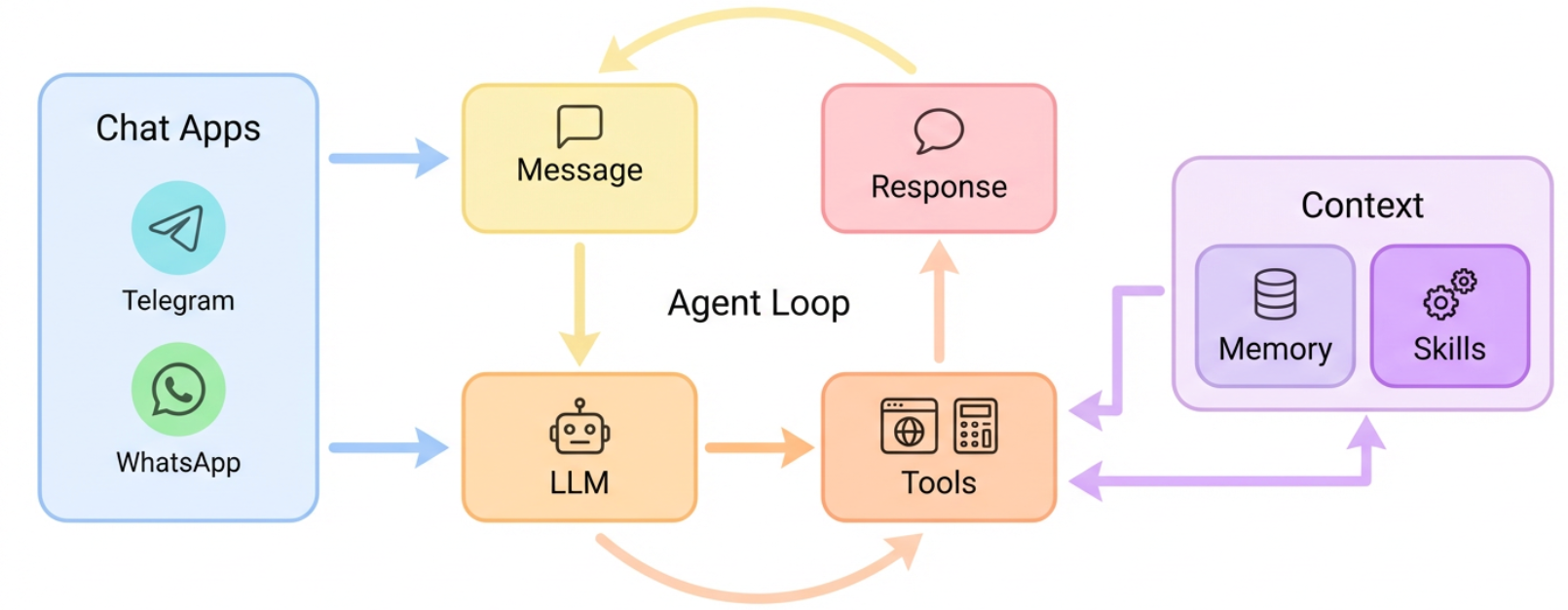
✨ Features
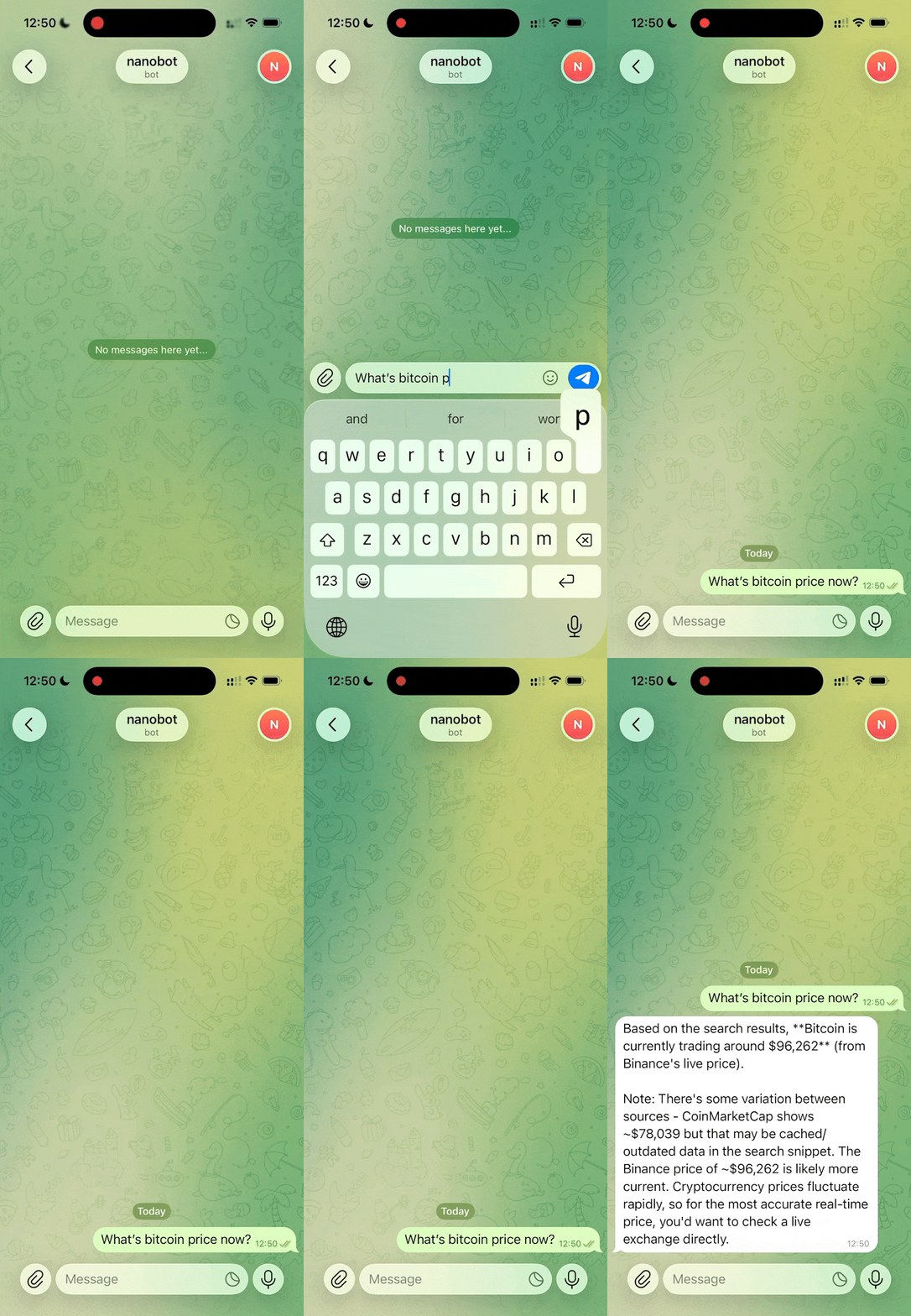
📈 24/7 Real-Time Market Analysis |
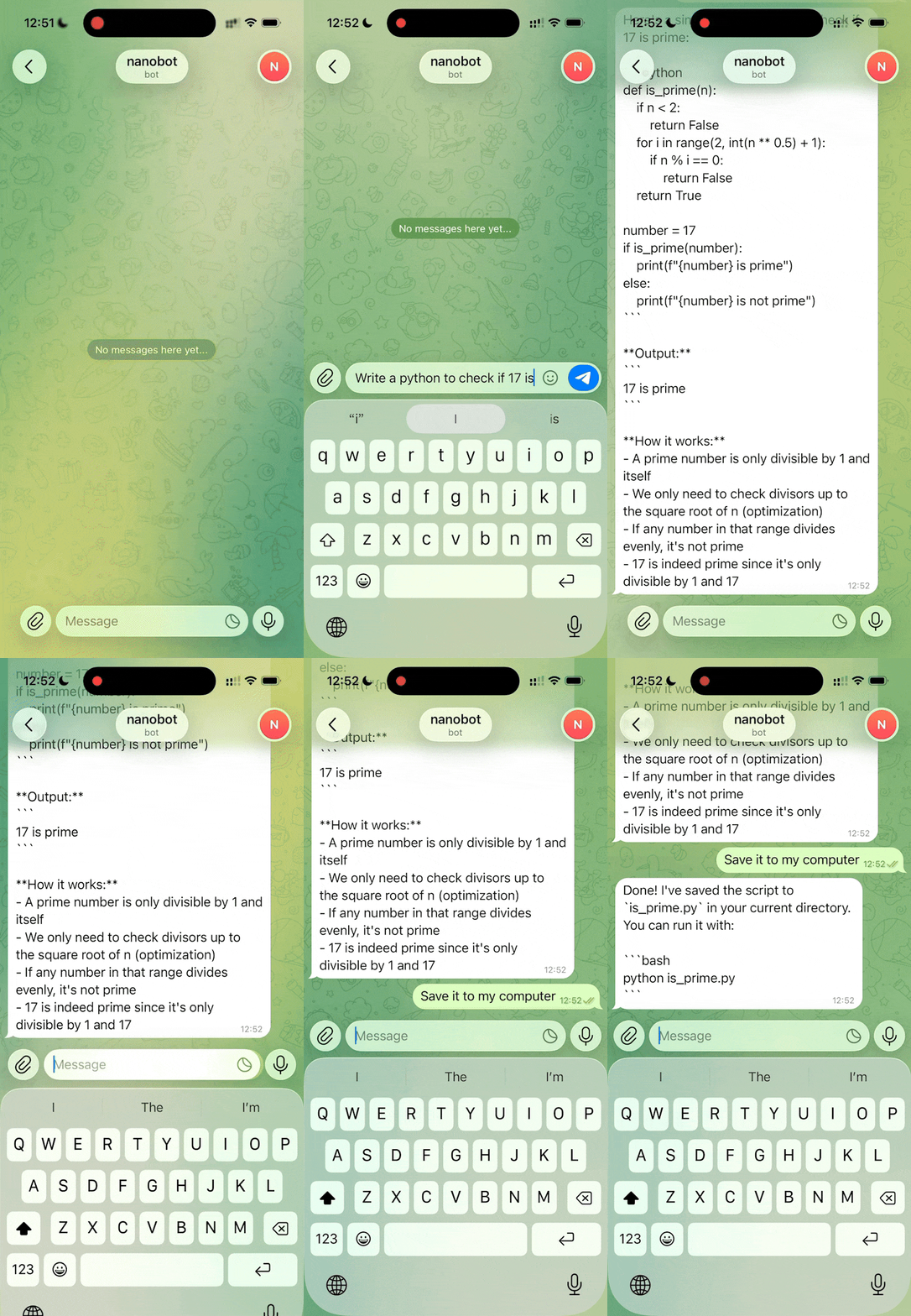
🚀 Full-Stack Software Engineer |
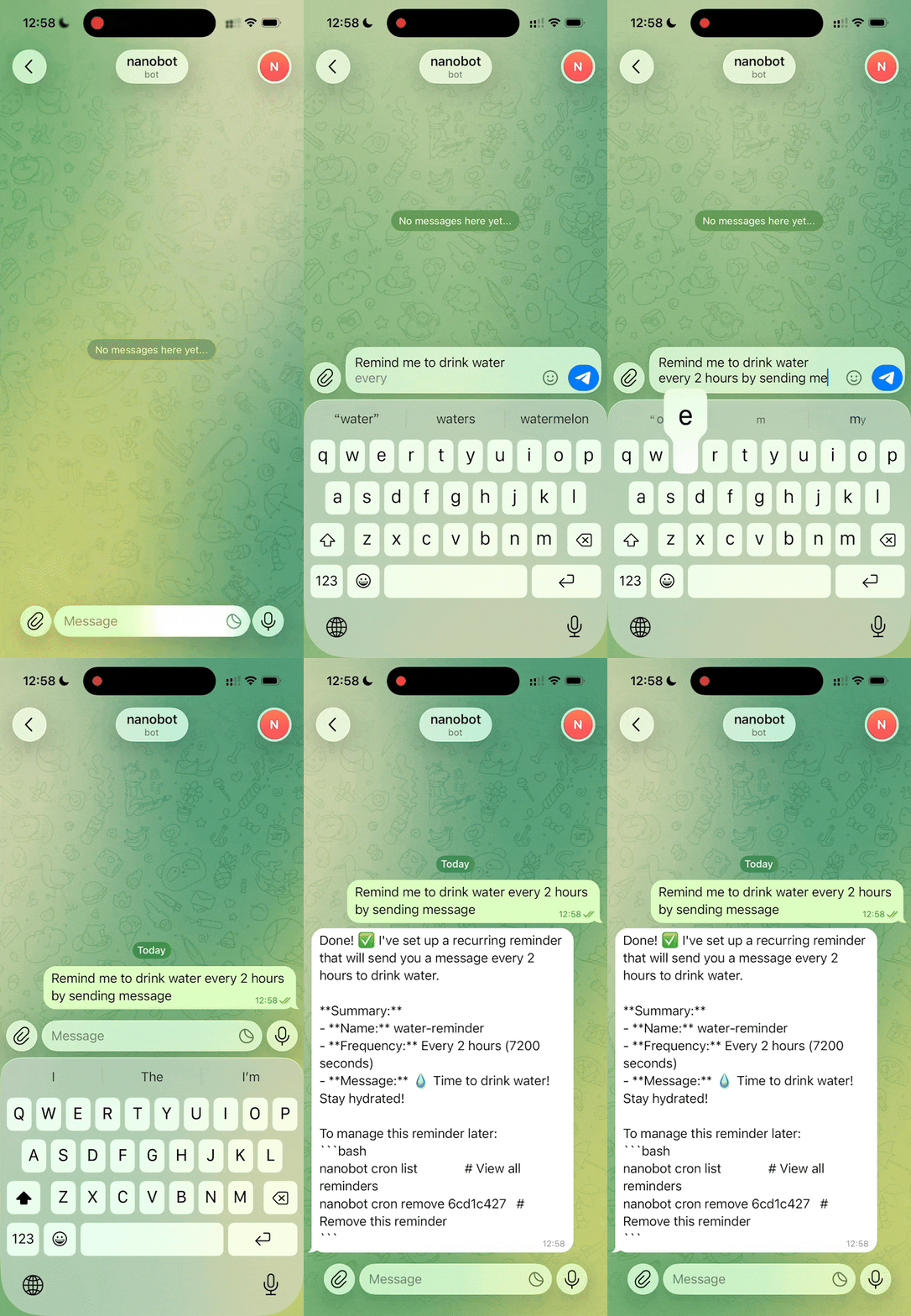
📅 Smart Daily Routine Manager |
📚 Personal Knowledge Assistant |
|---|---|---|---|
|
|
|
|
| Discovery • Insights • Trends | Develop • Deploy • Scale | Schedule • Automate • Organize | Learn • Memory • Reasoning |


📦 Install
Install from PyPi
pip install nanobot-ai
Install from source (recommended for development)
git clone https://github.com/HKUDS/nanobot.git
cd nanobot
pip install -e .
🚀 Quick Start
Tip
Set your API key in
~/.nanobot/config.json. Get API keys: OpenRouter (LLM) · Brave Search (optional, for web search) You can also change the model tominimax/minimax-m2for lower cost.
1. Initialize
nanobot onboard
2. Configure (~/.nanobot/config.json)
{
  "providers": {
    "openrouter": {
      "apiKey": "sk-or-v1-xxx"
    }
  },
  "agents": {
    "defaults": {
      "model": "anthropic/claude-opus-4-5"
    }
  },
  "webSearch": {
    "apiKey": "BSA-xxx"
  }
}
3. Chat
nanobot agent -m "What is 2+2?"
That's it! You have a working AI assistant in 2 minutes.
🖥️ Local Models (vLLM)
Run nanobot with your own local models using vLLM or any OpenAI-compatible server.
1. Start your vLLM server
vllm serve meta-llama/Llama-3.1-8B-Instruct --port 8000
2. Configure (~/.nanobot/config.json)
{
  "providers": {
    "vllm": {
      "apiKey": "dummy",
      "apiBase": "http://localhost:8000/v1"
    }
  },
  "agents": {
    "defaults": {
      "model": "meta-llama/Llama-3.1-8B-Instruct"
    }
  }
}
3. Chat
nanobot agent -m "Hello from my local LLM!"
Tip
The
apiKeycan be any non-empty string for local servers that don't require authentication.
💬 Chat Apps
Talk to your nanobot through Telegram or WhatsApp — anytime, anywhere.
| Channel | Setup |
|---|---|
| Telegram | Easy (just a token) |
| Medium (scan QR) |
Telegram (Recommended)
1. Create a bot
- Open Telegram, search
@BotFather - Send
/newbot, follow prompts - Copy the token
2. Configure
{
  "channels": {
    "telegram": {
      "enabled": true,
      "token": "YOUR_BOT_TOKEN",
      "allowFrom": ["YOUR_USER_ID"]
    }
  }
}
Get your user ID from
@userinfoboton Telegram.
3. Run
nanobot gateway
Requires Node.js ≥18.
1. Link device
nanobot channels login
# Scan QR with WhatsApp → Settings → Linked Devices
2. Configure
{
  "channels": {
    "whatsapp": {
      "enabled": true,
      "allowFrom": ["+1234567890"]
    }
  }
}
3. Run (two terminals)
# Terminal 1
nanobot channels login

# Terminal 2
nanobot gateway
⚙️ Configuration
Full config example
{
  "agents": {
    "defaults": {
      "model": "anthropic/claude-opus-4-5"
    }
  },
  "providers": {
    "openrouter": {
      "apiKey": "sk-or-v1-xxx"
    }
  },
  "channels": {
    "telegram": {
      "enabled": true,
      "token": "123456:ABC...",
      "allowFrom": ["123456789"]
    },
    "whatsapp": {
      "enabled": false
    }
  },
  "tools": {
    "web": {
      "search": {
        "apiKey": "BSA..."
      }
    }
  }
}
CLI Reference
| Command | Description |
|---|---|
nanobot onboard |
Initialize config & workspace |
nanobot agent -m "..." |
Chat with the agent |
nanobot agent |
Interactive chat mode |
nanobot gateway |
Start the gateway |
nanobot status |
Show status |
nanobot channels login |
Link WhatsApp (scan QR) |
nanobot channels status |
Show channel status |
Scheduled Tasks (Cron)
# Add a job
nanobot cron add --name "daily" --message "Good morning!" --cron "0 9 * * *"
nanobot cron add --name "hourly" --message "Check status" --every 3600

# List jobs
nanobot cron list

# Remove a job
nanobot cron remove <job_id>
📁 Project Structure
nanobot/
├── agent/          # 🧠 Core agent logic
│   ├── loop.py     #    Agent loop (LLM ↔ tool execution)
│   ├── context.py  #    Prompt builder
│   ├── memory.py   #    Persistent memory
│   ├── skills.py   #    Skills loader
│   ├── subagent.py #    Background task execution
│   └── tools/      #    Built-in tools (incl. spawn)
├── skills/         # 🎯 Bundled skills (github, weather, tmux...)
├── channels/       # 📱 WhatsApp integration
├── bus/            # 🚌 Message routing
├── cron/           # ⏰ Scheduled tasks
├── heartbeat/      # 💓 Proactive wake-up
├── providers/      # 🤖 LLM providers (OpenRouter, etc.)
├── session/        # 💬 Conversation sessions
├── config/         # ⚙️ Configuration
└── cli/            # 🖥️ Commands
🗺️ Roadmap
- Multi-modal — See and hear (images, voice, video)
- Long-term memory — Never forget important context
- Better reasoning — Multi-step planning and reflection
- More integrations — Discord, Slack, email, calendar
- Self-improvement — Learn from feedback and mistakes
Want to help? Pick an item and open a PR!
⭐ Star History
Community Growth Trajectory
🤝 Contribute
PRs welcome! The codebase is intentionally small and readable. 🤗
Thanks for visiting ✨ nanobot!