best-resume-ever
[](https://travis-ci.org/salomonelli/best-resume-ever)
:necktie: :briefcase: Build fast :rocket: and easy multiple beautiful resumes and create your best CV ever!
Made with Vue and LESS.
Cool


Creative

Green

AI B&W

Purple

Side Bar


Left Right


Material Dark

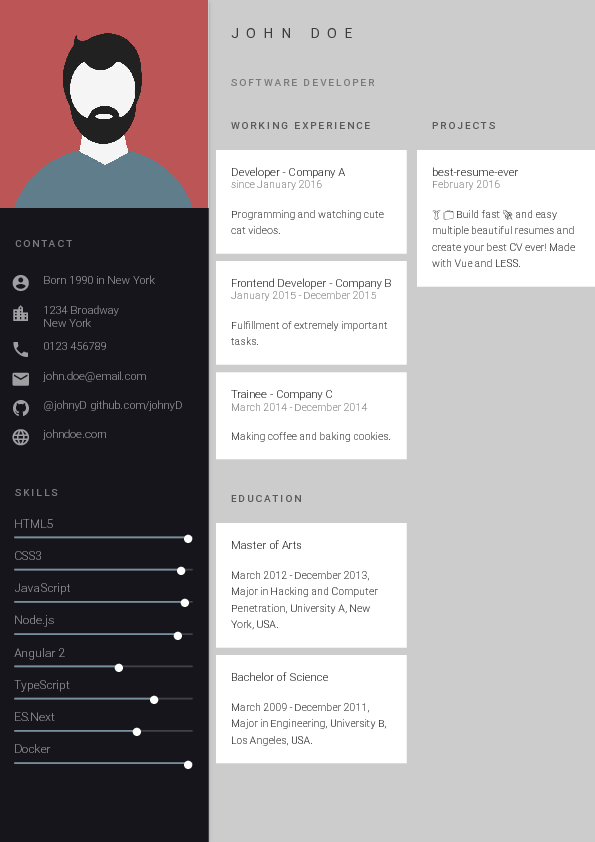
Oblique


## Prerequisite
1. It is required to have Node.js with version 8.5.0 or higher. To see what version of Node.js is installed on your machine type the following command in the terminal:
```
node -v
```
2. If you do not have installed Node.js in your machine then go to [this link](https://nodejs.org/en/download/) in order to install node.
## How to use
1. Clone this repository.
```
git clone https://github.com/salomonelli/best-resume-ever.git
```
2. Go to the cloned directory (e.g. `cd best-resume-ever`).
3. Run `npm install`. This may take a few seconds.
4. Customize your resume in the `resume/` directory. Data lives in one YAML file per profile, named `resume/.yml` (for example `resume/dobkin.yml`). The build defaults to the `dobkin` slug unless you set **`RESUME_NAME`** to another slug (without `.yml`). For a second profile, add `resume/cherepaha.yml` and run with `RESUME_NAME=cherepaha`. Convenience scripts are in `package.json` (for example `npm run dev:dobkin` and `npm run dev:cherepaha`).
For the profile photo, use **`resume/.jpg`** when it matches the active slug, otherwise the fallback **`resume/id.jpg`** is used.
5. Preview resumes with `npm run dev` (or `RESUME_NAME= npm run dev`). The command will start a server instance and listen on port 8080. Open (http://localhost:8080/home) in your browser. The page will show some resume previews. To see the preview of your resume, with your picture and data, click on one layout that you like and the resume will be opened in the same window.

6. Export your resume as PDF by running `npm run export` (with the same **`RESUME_NAME`** you used for dev, if not the default). To avoid errors from two `npm run` processes at once, stop any running `npm run dev` before exporting, unless you use a script that starts the dev server and export together (see `export:dobkin` and similar in `package.json`). You can also export a single template, for example `node scripts/export.js ai-bw`.
PDFs are written to the `pdf/` folder.
## Creating and Updating Templates
Please read the developer docs on how to create or update templates.
## Contribute
Feel free to add your own templates, language supports, fix bugs or improve the docs. Any kind of help is appreciated! If you make any kind of changes to an existing template, please commit them as new templates.
## Sponsored by
The NodeJs Database
## Credits
This project uses several open source packages:
- Vue
- Puppeteer
- LESS
---
> [sarasteiert.com](https://www.sarasteiert.com) ·
> GitHub [@salomonelli](https://github.com/salomonelli) ·
> Twitter [@salomonelli](https://twitter.com/salomonelli)
## License
[MIT](https://github.com/salomonelli/best-resume-ever/blob/master/LICENCE.md)